Sunday, November 1, 2015

OnePlus X: Exclusive Pre-launch Review


Hello Gadget lovers. We know you have been missing us, as in last few months we just missed you guys. Our fans requested us in past for the review of OnePlus 2 and we couldn't keep us with that request. To make it up to you, if you need an OnePlus 2 invite just comment below your email address.

Moving ahead considering in mind how much you love to know about gadgets, here is the Pre-Launch review of OnePlus X. Yeah you heard it right OnePlus X, a new device OnePlus will be launching soon. Here are some of the cool specifications of OnePlus X:
  • Screen Size: 5.0 inch Corning Gorilla Glass 3
  • Operating System: OxygenOS based on Android 5.1.1
  • Processor: Qualcomm SnapdragonTM 801 processor with 2.3 GHz Quad-core CPUs
  • Camera: 13MP rear , 8MP front
  • RAM: 3 GB
  • Storage: 16GB eMMC v5.0 (Expandable storage up to 128GB)
  • Dual SIM
  • Battery: Embedded rechargeable typical 2,525 mAh LiPo battery
Apart from the above specs, OnePlus X has slow motion video capture capability at 720p. If we talk about it's craftsmanship, OnePlus has done a solid work this time. OnePlus X will have two variants with either Ceramic or Onyx Glass Back, which makes it unique in-terms of design. Remember OnePlus One's sandstone back, OnePlus X has a different newer version of back as mentioned. 

Frankly speaking OnePlus 2 does not created a that much of bigger hype then OnePlus One. Now with OnePlus X, OnePlus team is following same path as OnePlus One. Anyways we liked the OnPlus X design, its sleek with really good specs. 

If we speak about the price then, we couldn't found any official post, but it's rumoured to be priced at approx  Rs. 16,999($250) the Onyx version and Rs. 22,999($350) the Ceramic version. OnePlus X will be available starting November 5.

This time OnePlus has decided to go with a slightly different strategy. After its launch only for the first month it will be available on Invite basis. After a month it will be available without an invite, cool is that may sound but an early hands on is always a better. You can follow this link to get into the reservation list for OnePlus X.

We will be sharing the invites for OnePlus X soon, so keep visiting us.


Friday, February 13, 2015

Shift for Android with an innovative way for your photo filters


We have found an app for you guys to try this weekend. Photo filter apps the flooding Android market, although Android does not provide much flexibility to handle photo filters like iOS does, some of the developers still have manage to provide you Android lovers with great photo filters apps. Previously we had featured Retrica and now we have another app for you name Shift. 

Idea behind shift is simple it just provide you with the photo filters for your already taken images from your any camera. It's the simplicity of the concept that we liked at first glance. Shift at start gives you a screen having demo image and you can apply filters to that. You have provided with the option to save filters for future use, as Shift generates filters for you randomly.

There are limitless possibilities for photo filters with shift, but it's randomness sometimes became tedious to find the best filter for your image. You may find yourself getting annoyed at some point, still Shift has a great innovation in it. Shift also has more to offer where you can drag, rotate and pinch points to personalize.

Note that we are not promoting Shift here, it's our frank review of the app and we recommend that you should give Shift a try. It's available for free on Play Store.


#Android #AppReview #PhotoFilters 

Thursday, January 29, 2015

Use this Android apps to keep your favourite apps protected


Many of you might be knowing about the AppLock Android App, if not then AppLock provides you with the ability to add one more security layer in Android using which you can protect your Android apps like Facebook, Gallery etc where you have your personal things. We have reviewed two more apps and AppLock for you to check out and decide which one you wanna use to secure your apps. 
  • LOCX:
LOCX: App Lock & Photo Vault is on top of our list as it impressed us by it's light weight APK size and too cool material design. Like any other lock app it comes with all the basic features to secure your apps. One new feature that would impress you is the Chameleon which disguise your lock screen to prevent from breaking into your password. Fingerprint scanner and fake force close dialog are now supported, and more covers are coming soon. Try LOCX on Play Store.
play store
  • LockDown Pro:
Second in the list LockDown Pro is having reasonable amount of APK size. The features that we like about LockDown Pro is it's ripple effect implementation in app and support of Calculator lock which is unique of it's kind. LockDown Pro is featured as Top 5 Apps for 2014 by xda-developers.It also supports 30 languages and fake cover. Try LockDown Pro on Play Store.
  • AppLock:
Most of you must be knowing about AppLock as it's too for securing your apps, but as in recent update AppLock has drastic changes. Main thing we didn't liked is their ads implementation which makes it annoying. But it still tops the Play Store due to it's past reputation and that's why it's at botttom of our list. Try AppLock on Play Store.

#Android #AppReview #AppLock


Tuesday, January 27, 2015

Samsung's Tizen move and launch of Samsung Z1


Samsung a south korean company in past has ruled India with their smartphone products, but recently with launch of Moto (Which started revolution in smartphone market), followed by Xiomi and player like ASUS has made lost their roots in India. Apart from this Samsung has also taken a battle against Android. Now Samsung has launched it's open source Android rival OS named Tizen and launched Samsung Z1 to stay in the low-budget smartphone market. So here is the battle report and Samsung Z1 specs review.

First about Tizen (pronounced “tie-zen”) operating system, Samsung developed Tizen with Huawei Technologies and Intel Corp to challenge the Android software that powers most of the world's mobile devices. Samsung have already featured Tizen in it's wearables and cameras, they have mentioned in their blog that "will feature prominently in most of our smart appliances and all of our Smart TVs throughout 2015."

Explaining why Samsung is going with Tizen, on Samsung's official blog they mentioned that "The benefits of Tizen are very simple: Tizen is “lighter” than other operating systems." Currently most of the smartphones of Samsung is powered by Android but they have launched Z1, regarding that Samsung mentioned that "we introduced our first Tizen smartphone, the  Samsung Z1. But, these devices are just the tip of the iceberg."

Before we comment anything about Samsung to touch tip of iceberg, here are some of the tech specs of Samsung Z1:
  • Screen Size : 4” WVGA PLS screen,
  • OS : Tizen OS, v2.3
  • Processor : Dual-core 1.2 GHz Cortex-A7
  • RAM : 768 MB
  • Memory : 4 GB internal with microSD, up to 64 GB
  • Camera : 3.15 MP rear, 2048 x 1536 pixels, LED flash
  • Battery : Li-Ion 1500 mAh battery
Samsung Z1 is priced at around Rs. 5500(not exact). Business Korea has reported that "Samsung Electronics has reportedly sold over 50,000 units of its first Tizen-enabled Z1 in India only 10 days after its launch. The number is higher than initially thought "

The number suggested by Business Korea suggest that Z1 has got good response from India, but inside story can be different. We know India likes Samsung but current competitors like Moto, Xiaomi, ASUS, Huawei and others like OnePlus One who recently got very good response will give them a tough battle to survive. Apart from that Battle against world's mostly used mobile operating system Android will haunt Samsung into their dreams. 

#Samsung #Google #Android #Tizen #SmartPhone #Gadgets


Saturday, January 24, 2015

Microsoft HoloLens: The era of holographic computing is here


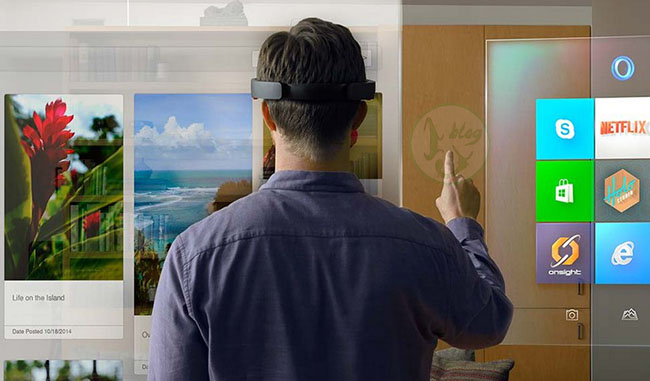
microsoft hololens hologram
Few days ago Microsoft had arranged an launch event for it's upcoming Windows 10, about which we had give you some idea as upcoming Windows is Windows 10 and not Windows 9. In that event Microsoft showed an Amazing cool holographic computing gadget HoloLens and Holographic technology. So here is what you should know!

Big players like Google, Apple and Tesla has been announcing their breakthroughs into technology like crazy, but Microsoft with it's Project HoloLens has given an impact that it's also not behind in that race. There are many post writing big lines and para's about this news, but lets us tell you in simple words what you can do with Microsoft's HoloLens.

With Microsoft's HoloLens which is kind of a big goggles, you can virtualize things like you design things in real, watch TV, see the updates regarding weather or any sports simply displayed as holograms.

As Microsoft says "Holograms will improve the way you do things every day, and enable you to do things you’ve never done before." Without wasting much time, just watch below video to see the possibilities with Microsoft's holoLens technlogy.


#Microsoft #Gadget 


Thursday, January 22, 2015

WhatsApp Update: Now available to access on Web


WhatsApp which has been acquired by Facebook is the heartthrob of billion people. Many of you must be the dard hard user of WhatsApp in your daily life. Now WhatsApp has just launched an new update and it might surprise you a bit.

Recent update of WhatsApp will allow us to use it using Web Browser as mentioned on their official blog " millions of you will have the ability to use WhatsApp on your web browser." Currently though users can only access WhatsApp Web on Google Chrome only, WhatsApp will be supporting other browser in near future. 

With WhatsApp Web your experience will be same, this means still your mobile will have all your messages but you can have your messages on web too. Now to use WhatsApp Web it's simple, just follow below steps:

  1. Update to recent version of WhatsApp on your favourite Smartphone.
  2. Visit web.whatsapp.com in Google Chrome browser.
  3. Scan the QR code shown on the web.whatsapp.com inside the WhatsApp on your Smartphone under 'WhatsApp Web' menu option.
One thing to note here is currently WhatsApp Web is not supported for iOS devices due to Apple Platform limitation. Also your phone needs to stay connected to the internet for WhatsApp web client to work. 


Do let us know what you think about the WhatsApp's Web move. keep visiting us for dose of internet.

#WhatsApp #HowTo #Android #AppReview


Giveaway 5: An OnePlus One India Specific Invite


OnePlus One Never Settle
Hello friends, We are back as promised with another Flagship Killer India Specific Invite. Many of you might be still waiting for an invite to grab your hands on the Killer smartphone, as Oneplus One inviteless sell was not for india. Here are some the features of OnePlus One that you should look for before buying it from Amazon India :
  • Android : Cyanogenmod 11.0 (Android based)
  • Screen Resolution : 5.5 inches with Gorilla Glass
  • Internal memory : 64 GB
  • RAM : 3 GB
  • Camera : 13 MP rear and 5 MP front
  • Processor : Quad-core 2.5 GHz 
Giveaway will end as soon as we get sufficient entries. Enter this giveaway by simply following instructions below :


We wish you the best of luck. Hope you like this giveaway and we will share more invites in future for those who need it badly. Do comment below for how badly you require an OnePlus One India invite? Stay Tuned.

Note: This is for indian readers only. All rights are reserved with IJBlog.

#OnePlusOneInvite #Giveaway #India


Monday, January 19, 2015

Lazy Swipe: ONE HAND and ONE SWIPE,do whatever you want!


lazy swipe
We have found another innovative yet useful Android app which can give it a try. Are you an Android user who likes have their recent and frequently used app at your one touch, then Lazy Swipe an Android app about which we are about to tell you can make your day easy.

As mentioned in headline Lazy Swipe is the app which will use your ONE HAND and ONE SWIPE and will allow you to do whatever you want! We used this app for few days and now we are here to tell you why you should give it a try and what are some of the things Lazy Swipe need to improve on.

First Lazy Swipe has a really innovative way of giving you an drawer having recently used app, frequently used app and toolbox which contains good features like Torch button, Mobile data on/off, Airplane Mode, etc  general settings which can benefit in day to day use. You can swipe on bottom left corner and bottom right corner, also you can increase the swipe area.

Now few things we didn't liked about Lazy Swipe is, they have given RAM booster button in Toolbox which is kind of no use in terms of, it does really perform the boosting function. Also on small screen devices(4.5 inches and below) while scrolling left to right or wise versa opens Lazy Swipe drawer accidently, which is annoying sometime.

We recommend, Lazy Swipe is worth giving a shot and we leave it up to you to decide whether it's useful or not, do let us know what are your thoughts on to it. You can download it from Google Play button below.
Google Play Button
#Android #Appreview #LazySwipe #Productivity


Saturday, January 17, 2015

Try Notific to get your notifications on your lock screen


Android is the booming Mobile Operating System and to find the right apps in the Google's Play Store for your Android is very tedious, you can waste your hours of time in that. So to save your efforts, here we are with another Android app name Notific which enables your Android to show your notifications on your lock screen. Read below why you should use this app.

As said earlier Notific enables you to show notification on your lock screen, it's material design recent update is simply elegant and makes user experience super cool. Notific has Pro paid version and the free version, free version is enough to make your experience awesome, though if you like if you can try the pro.

Other Few things that we liked about Notific is it's app size which is very less compared to other messy app available in the market and noticeable thing. It has settings related to sensors which is very useful. You can choose your own style from THREE different themes, Jellybean HOLO, Android Wear inspired Material and Ambient Display inspired dark (AMOLED friendly) theme.

As mentioned on their app page, Notific is under development for more features and seeing current functionally we can say that it will rock the market. we recommend you to try it's free version which you can install it from below:


#Android #AppReview #LockScreen


Giveaway 4: An OnePlus One India Specific Invite


OnePlus One Never Settle
Hello friends, We are back as promised with another Flagship Killer India Specific Invite. Many of you might be still waiting for an invite to grab your hands on the Killer smartphone. Here are some the features of OnePlus One that you should look for before buying it from Amazon India :
  • Android : Cyanogenmod 11.0 (Android based)
  • Screen Resolution : 5.5 inches with Gorilla Glass
  • Internal memory : 64 GB
  • RAM : 3 GB
  • Camera : 13 MP rear and 5 MP front
  • Processor : Quad-core 2.5 GHz 
Giveaway will end tomorrow at 12:00 AM(We can end this soon if we get sufficient entries). Enter this giveaway by simply following instructions below :


We wish you the best of luck. Hope you like this giveaway and we will share more invites in future for those who need it badly. Do comment below for how badly you require an OnePlus One India invite? Stay Tuned.

Note: This is for indian readers only. All rights are reserved with IJBlog.

#OnePlusOneInvite #Giveaway #India


Bring your Selfies to life with Retrica Android app


Retrica android app
The best things always comes free and we are here to tell you about an Android app named Retrica which allows you to take great #Selfies. Find below the full review about Retrica.

Note that we are not promoting apps here, we are just sharing with you the great stuff that you should know and give a try. Now you must be thinking that currently there are so many photo taking apps available in the market, but why you should choose Retrica!! Retrica as their app developers says is the great app to take selfies.

Retrica has around 80 filters for you to customize your photos/selfies. Apart from that basic cropping and other functionality. Now most of photography apps have that but the filters Retrica is offering is unique. Some of the features of Retrica are Vignette Borders, Collage, Watermark, Timer and Blur image. Also with retrica you can click many images simultaneously with just one click. We like the way they have provided all in one features for you.

Now there are few things which we didn't like much. First to capture a image you need to click a button, from user perspective app should click image clicking anywhere on screen in camera visible area. Also They have ads placed apart from in-app purchase. They should have gone with in-app purchase. This are no major issue to worry about.

So we recommend Retrica to selfie loves and those who loves to give effects to their photos. Check Retrica on Play Store.
Google Play Image

#Andoid #AppReview #Photography #Camera


Friday, January 16, 2015

Google unleashes it's build-it-yourself Project Ara, Debut in Puerto Rico


google project ara

Google a tech innovative giant whose one of the vision is to build a affordable cheap smartphone keeping the best quality. Project Ara one of the Google's modular smartphone project which has been in the news in one or another way has finally arrived and Google has unleashed it's dragon. Below find what's this all about.

Previously Project Ara was known as 'PhoneBloks'. Project Ara is based on this question "The smartphone is one of the most empowering and intimate objects in our lives. Yet most of us have little say in how the device is made, what it does, and how it looks. And 5 billion of us don't have one. What if you could make thoughtful choices about exactly what your phone does, and use it as a creative canvas to tell your own story? "

With Project Ara you will be able to build your own smartphone with your own hand. Yes you have read it right. Currently Google showed off the latest prototype on, and said that it will start selling its first modular phone in Puerto Rico later this year.

We won't go much deeper into why Google has choose Puerto Rico, but main thing to know here is it's finally out and with this Google will rock the world. Google says that this modular approach, which it calls Project Ara, will lead to inexpensive smartphones that can be customized and upgraded by users depending on their budget or personal requirements. 

The Project Ara modules on the back include a camera, USB charger, Wi-Fi, and Bluetooth radios, and the device’s main processor. The display and receiver module on the front can also be swapped out. All the modules are held in place by magnets in the device’s frame. Shoeing the demo Google’s Advanced Technology and Projects (ATAP) group revealed the Spiral 2 on Wednesday during a crowded event for software developers at a Google office in Mountain View, California. Watch below video which gives you some hints on what you can do with Project Ara.


#ProjectAra #Google #GoogleProject #Smartphone


Xiaomi on the move to beat Apple with it's Mi Note


xiaomi mi note
Xiaomi is famous to copy the Apple, currently know as the Apple of China is on the  move to beat Apple with it's upcoming flagship phone Mi Note. Here is the overview of the smartphone that you need to know.

Today on Jan 16th, 2015 Xiaomi CEO Lei Jun formally launched two Mi Note phones which he claimed will challenge iPhone 6 and 6 plus in looks, size and in camera quality. Here are the tech specs of Mi Note :
  • Screen Size : 5.7” Sharp/JDI Full HD display
  • Processor : Snapdragon 801 2.5GHz, Adreno 330, 
  • RAM : 3 GB
  • Camera : 13MP rear , 4MP front with Flash
  • Battery : 3000mAh lithium-ion battery, Quick Charge 2.0
  • 3D curved Gorilla Glass 3 with metal frame
With Mi Note Pro this specs get even better. Some of the specs of Mi Note Pro are :
  • Screen Size : 5.7” 2K display (2560 x 1440 at 515 PPI)
  • Processor : Snapdragon 810 64 bit 8-core, Adreno 430 GPU 
  • RAM : 4 GB
Above mentioned features are the currently known to us and from those features you can have an idea that Xiaomi is trying take down Apple's position in the market as it's CEO has suggested. In terms of the price, both the phones are offered at 2,299 yuan (roughly Rs 23,000) for the 16GB model and 64GB model of the Xiaomi Mi Note will come at 2,799 yuan (roughly Rs 27,900) far cheaper than the new iPhone models. 

Also there is no official announcement for the price, but soon they will announce it on their website. Apart from this launch, Wall Street Journal reported that Xiaomi aims to enter Brazil, Russia and other emerging markets in 2015. The company is already in seven markets outside of mainland China. 

Xiomi also has uploaded a promo video for their Mi Note on youtube and we gotta have to say it looks stunning in that. Watch the video by clicking here and decide yourself. Will Xiaomi be able to beat the Apple bonanza!!! do let us know what are your thoughts about this!

#SmartPhones #Xiaomi #Apple #MiNote #MiNotePro


Monday, January 12, 2015

Learn how to Search Google like a pro with an interactive Infographics


Google a Company which changed the way we used to surf. We use Google to check if our Internet connection is working or not. Whenever you need any information, you just open Google and type it down what you need to know. But do you know there is trillions of information available on Internet and to find the right information that you require through Google there is some tricks that you need to know. Every Google Searcher should know this.

Google has many products which every one of us use it in one or another way. Google Images, Google Book, Google Play etc, you won't even survive a day without Google search. So below is a great Infographics to give some tips on how you should surf the Google. Do share if you find this useful.


#Google #Search #HowTo #Internet #infographics


A Chinese Company Sells Apple Smart Watch Replica for $36


Hyperdone Smart Watch

CES 2015 has just ended, this year's motto was to connect anything and everything on the internet. Wearables are the future, we have always mentioned that Wearables will change everything. Now currently we are here to  share you about a Chinese Company which has same design as of Apple's Smart Watch and their price is only $36, so let's go deeper into it.

This story was originally published on Mashable, According to Mashable, one of their journalists stumbled upon Shenzhen-based Hyperdon displaying and selling fake Apple Watches in one of the smaller halls at the tech show CES 2015.

This tiny but power packed watch charges via a USB cable, and a Hyperdon representative claimed the battery life is "more than 180 hours," Apart from this The Smart Watch also has a pedometer, stopwatch, alarm and something called "Anti lost", it likely alerts you when you get out of Bluetooth range.

Now this proves one thing that how chinese manufactures are copying Apple to break it's market, after Xiomi which is currently known as Apple of China and iPhone of Android, CES showed many chinese manufacturers which has potential and Hyperdon is one of them.

You can wait for the real deal when Apple will release it's Smartwatch which you can grab for around $349 or else you can consider Hyperdron's tiny Smart Watch a try. Do let us know what you think about Wearables and especially Smart Watches in future, in below comment section.

#CES2015 #Wearables #SmartWatch


Sunday, January 11, 2015

Giveaway 3: An OnePlus One India Specific Invite


OnePlus One Never Settle
Hello friends, We are back as promised with another Flagship Killer India Specific Invite. Many of you might be still waiting for an invite to grab your hands on the Killer smartphone. Here are some the features of OnePlus One that you should look for before buying it from Amazon India :
  • Android : Cyanogenmod 11.0 (Android based)
  • Screen Resolution : 5.5 inches with Gorilla Glass
  • Internal memory : 64 GB
  • RAM : 3 GB
  • Camera : 13 MP rear and 5 MP front
  • Processor : Quad-core 2.5 GHz 
Giveaway will end tomorrow at 12:00 AM(We can end this soon if we get sufficient entries). Enter this giveaway by simply following instructions below :


Winner is : nabeel.m.ahmed@gmail.com

We wish you the best of luck. Hope you like this giveaway and we will share more invites in future for those who need it badly. Do comment below for how badly you require an OnePlus One India invite? Stay Tuned.

Note: This is for indian readers only. All rights are reserved with IJBlog.

#OnePlusOneInvite #Giveaway #India


Saturday, January 10, 2015

CES 2015: Summary with must know things in Smartphones and Wearables


CES 2015

CES(Consumer Electronic Show) every year comes with great stuff to show from big brands. This years CES has ended and there's much innovation and the tech revealed that you should know. We had written a post for LG's upcoming G Flex 2 which they revealed in CES 2015 this year, it was just start.

Las Vegas where the event was held this year saw amazing innovation starting from LG's G Flex 2 to Samsung's Galaxy A5. Mainly two maktes tech giants have focused on which we describe for you below.

Everything about Smartphones

As mentioned in first para, LG started the CES with it's flagship flexible smartphone's next version named G Flex 2. G Flex 2 is powered with 5.5 inches screen with Snapdragon 810. Samsung revealed it's most awaited Galaxy s6 which is expected to get it's hands on market in march. This year Samsung has more focused on SUHD television and other services which includes Milk Music streaming service.

Every one was expecting Sony to reveal it's Z4, but instead Sony had different plans and Sony has focused on it's Smartwatch 3. Unveiling one more niticible thing Sony gave more light on it's next generation Music Player The Walkman series next model.

HTC had showcased two of it's giant starting with Desire 826 running Android 5.0 with sense UI on top, powered with Snapdragon 605 having 5.5 inches screen and an entry level smartphone Desire 320 which 4.5 inches screen.

Most unexpected move was from the rising start of smartphone industry ASUS. Asus gave lights on it's Zenfone 2 series starting at price $199, a budget friendly series it will be.  The star of the show for ASUS, however, was undoubtedly the Zenfone Zoom, sporting a 3x optical zoom lens with hardware stabilization in front of its 13MP sensor.

Apart from this major updates Lenovo announced a myriad of devices ranging from smartphones with quirky flashes to Yoga branded tablets and convertibles. Nokia 215 also marked Microsoft's present in the show which is the cheapest phone to surf internet. Huawei also revealed it's Honor 6.

Everything about Wearables 

You should know that wearables are the future of electronics industry and from last few years, CES has been getting more wearable show cases. In the CES Marketplaces this year tech got split into categories like Wearables, Health & Wellness, Fitness & Technology, Smart Watches and Sports Tech, all of which contained, amongst other things, wearables of some kind.

Many small start-up's have show cased their wearables in above mentioned categories. One of which was iDevices Switch which let you handle your house with just a command to your Siri, we also posted a blog for the same. 

#CES2015 #Smartphones #Wearbles


Friday, January 9, 2015

Infographic: 7 Controversial Figures Of Internet Freedom


7 Controversial Figures Of Internet Freedom
7 Controversial Figures Of Internet Freedom [Infographic] by the team at Quality Nonsense Ltd


Wednesday, January 7, 2015

Giveaway 2: An OnePlus One India Specific Invite


OnePlus One Never Settle
Hello friends, We are back as promised with another Flagship Killer India Specific Invite. Many of you might be still waiting for an invite to grab your hands on the Killer smartphone. Here are some the features of OnePlus One that you should look for before buying it from Amazon India :
  • Android : Cyanogenmod 11.0 (Android based)
  • Screen Resolution : 5.5 inches with Gorilla Glass
  • Internal memory : 16/64 GB
  • RAM : 3 GB
  • Camera : 13 MP rear and 5 MP front
  • Processor : Quad-core 2.5 GHz 
Giveaway starts at 12:00 AM today. Enter this giveaway by simply following instructions below :


We wish you the best of luck. Hope you like this giveaway and we will share more invites in future for those who need it badly. Do comment below for how badly you require an OnePlus One India invite? Stay Tuned.

Note: This is for indian readers only. All rights are reserved with IJBlog. 


Essential Windows 8 keyboard shortcuts to increase your productivity


Windows 8 shortcut

It's been long time since windows 8 out in market and many you might be not knowing the basic keyboard shortcuts that can help you increase your productivity in day to day life work on your Windows 8 pc. You must be knowing the very basic keyboard shortcuts like 'Ctrl+c', 'Ctrl+v', 'Home', 'End' etc. 

We have seen few people who still uses arrow keys to reach to start and end of the line. So for them, 'Home' key can help you to reach start of a text line and 'End' key can help you to reach end of a text line. If you want to go extreme start of a text snippet shortcut is 'Ctrl+Home' and to go extreme end of a text snippet shortcut is 'Ctrl+End'.

Apart from the discussed keyboard shortcuts there are many essential keyboard shortcuts you should know, which we have listed below :
  • Ctrl + Alt + PrtSc: Take screenshot of the active window and you can use taken screenshot in word, excel, paint, online editing tools etc. ( For those who only knows PrtSc this can improve their productivity.)
  • Ctrl + N: To create a New folder in the explorer
  • Windows Key + D: Shows desktop
  • Windows Key + E: Open Explorer
  • Windows Key + L: Locks Computer and goes to Lock Screen
  • Windows Key + X: Shows advanced Windows Setting Menu
  • Windows Key + C: Shows Charms menu (Menu that comes on right side in Windows 8)
  • Windows Key + I: Shows Chams menu settings
  • Windows Key + , : Shows desktop temporarily
  • Windows Key + Up Arrow: Maximize current window
  • Windows Key + Down Arrow: Minimize current window
  • Windows Key + Left Arrow: Maximize current window to left side of the screen
  • Windows Key + Right Arrow: Maximize current window to right side of the screen
  • Ctrl + Shift + Esc: Open Task Manager
  • Alt + Enter: Show Properties of selected item in File Explorer
  • Alt + Left Arrow: View previous opened folder in File Explorer
  • Alt + Right Arrow: View next folder in File Explorer
  • Alt + F4: Exit current focused Window or Application
Above list is the partial list from the full list which we have picked up for you people to increase your productivity using Windows PC. hope this will help you amazing people achieve your daily tasks in no time. For more such info keep visiting us.